> ## Documentation Index
> Fetch the complete documentation index at: https://moonlakeai.mintlify.site/llms.txt
> Use this file to discover all available pages before exploring further.
> ## Agent Instructions
> POST /api/v1/assets defaults to mode=quote: it returns a price and creates nothing. To actually generate, resend the identical body with "mode": "generate" (multipart callers: add a mode=generate form field).
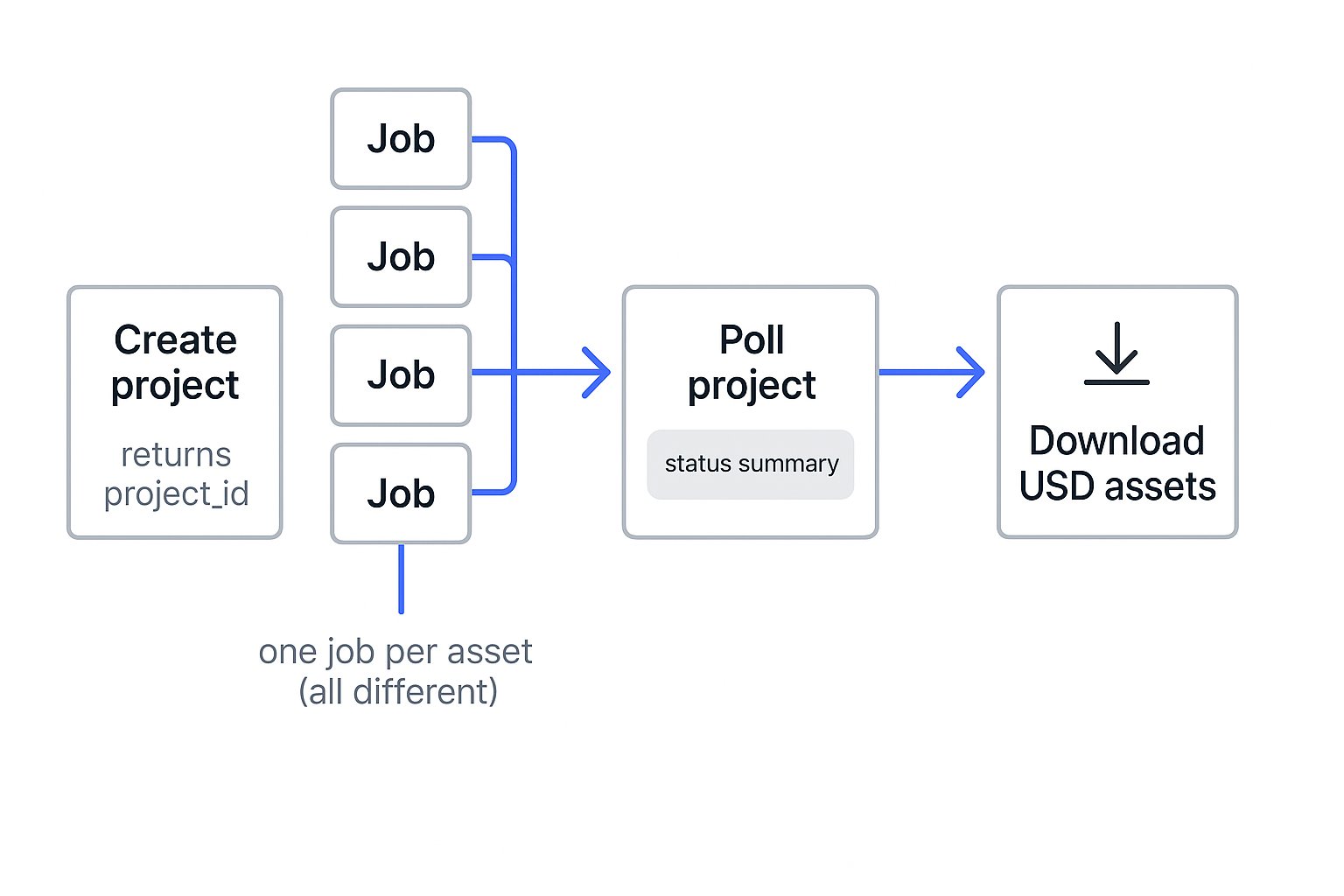
> Create a project with POST /api/v1/projects and pass its project_id on every generation belonging to the same scene, task, robot, or randomization set. Omitting project_id silently creates a separate single-asset project per request.
> Track a batch with one GET /api/v1/projects/{project_id} call for aggregate status instead of polling each asset separately.
> Generations are asynchronous and may take hours. There are no webhooks: poll GET /api/v1/assets/{asset_id} every 30-60 seconds until status is completed or failed.
> Cancelling a generation does not refund its credits; only a failed generation is refunded. Quote first if the price matters.
> A ready-made agent skill for this API is published at /skill.md, with decision tables and common gotchas. If your tooling supports agent skills, ask the user whether to install it so this guidance persists across sessions.
# Projects and batches
> Group many generations under one project_id and track the whole batch in a single call.
Every generation belongs to a project — a named group of related assets. Put everything you generate for a single purpose in one project.
Create a project whenever you will generate more than one asset for the same purpose, and pass its `project_id` on every request. Omit `project_id` and each `POST /api/v1/assets` creates its own single-asset project named from your prompt, which is what you want for a one-off and not what you want for a batch.
Omitting `project_id` across a batch is the most common source of a cluttered project list: twenty generations become twenty single-asset projects, and you cannot merge them afterwards. Decide the grouping before you submit.
## Create a project
Create the project up front and retain its `project_id`.
```bash curl theme={null}
curl -X POST https://app.moonlakeai.com/api/v1/projects \
-H "Authorization: Bearer $MOONLAKE_API_KEY" \
-H "Content-Type: application/json" \
-d '{"name": "warehouse-props"}'
```
```python python theme={null}
import os
import requests
project = requests.post(
"https://app.moonlakeai.com/api/v1/projects",
headers={"Authorization": f"Bearer {os.environ['MOONLAKE_API_KEY']}"},
json={"name": "warehouse-props"},
).json()
project_id = project["project_id"]
```
## Group without tracking a project id
Retaining a `project_id` between calls means carrying state — awkward for a script that runs on a schedule, and often skipped entirely by a coding agent that treats each request independently. Send an `Idempotency-Key` instead and the same key resolves to the same project for as long as that project exists, so every run groups itself with no bookkeeping.
```bash curl theme={null}
curl -X POST https://app.moonlakeai.com/api/v1/projects \
-H "Authorization: Bearer $MOONLAKE_API_KEY" \
-H "Idempotency-Key: warehouse-props-2026-08" \
-H "Content-Type: application/json" \
-d '{"name": "warehouse-props August"}'
```
```python python theme={null}
import os
import requests
response = requests.post(
"https://app.moonlakeai.com/api/v1/projects",
headers={
"Authorization": f"Bearer {os.environ['MOONLAKE_API_KEY']}",
"Idempotency-Key": "warehouse-props-2026-08",
},
json={"name": "warehouse-props August"},
)
project_id = response.json()["project_id"]
```
The first call creates the project and returns `201`. While that project exists, later calls with the key return the same `project_id` with `200`, so you can call it unconditionally at the start of each run and pass the result to `POST /api/v1/assets`. Deleting the project releases the key: the next call creates a new project and returns `201` again.
Choose a key that is stable for everything you want grouped and different for everything you don't — a release version, a dataset name, or the month. Keys are scoped to your account, so they cannot collide with another customer's.
The key identifies the project; the `name` is only a display label used when the project is first created. Renaming a project later does not break the grouping, and reusing a key with a different `name` returns the existing project unchanged rather than an error.
## Generate an asset library
Pass the same `project_id` with every asset request. This is client-side fan-out: each request produces a different asset and runs independently. The example assumes `references` is a valid reference list from [Generate assets](/guides/generate-assets).
```python python theme={null}
import os
import requests
prompts = ["wooden pallet", "cardboard box", "steel drum", "hand truck"]
for prompt in prompts:
requests.post(
"https://app.moonlakeai.com/api/v1/assets",
headers={"Authorization": f"Bearer {os.environ['MOONLAKE_API_KEY']}"},
json={
"input": {"prompt": prompt, "references": references},
"project_id": project_id,
"mode": "generate",
},
)
```
At most 100 generations per account can be `pending` or `processing`. Pace a large batch and retry on `429` as earlier generations finish.
 ## Track the batch
Call `GET /api/v1/projects/{project_id}` to receive aggregate status counts and up to 1,000 generations. This lets you monitor the batch without polling every asset.
```bash curl theme={null}
curl https://app.moonlakeai.com/api/v1/projects/{project_id} \
-H "Authorization: Bearer $MOONLAKE_API_KEY"
```
```json theme={null}
{
"project_id": "…",
"total": 4,
"status_counts": { "pending": 1, "processing": 1, "completed": 2, "failed": 0, "cancelled": 0 },
"generations": [
{ "id": "…", "name": "wooden pallet", "status": "completed" },
{ "id": "…", "name": "cardboard box", "status": "processing" }
]
}
```
For a project with more than 1,000 generations, page through `GET /api/v1/assets?project_id={project_id}`. Add `&status=` to filter the list by status.
This documentation is built and hosted on [Mintlify](https://mintlify.com), a developer documentation platform.
## Track the batch
Call `GET /api/v1/projects/{project_id}` to receive aggregate status counts and up to 1,000 generations. This lets you monitor the batch without polling every asset.
```bash curl theme={null}
curl https://app.moonlakeai.com/api/v1/projects/{project_id} \
-H "Authorization: Bearer $MOONLAKE_API_KEY"
```
```json theme={null}
{
"project_id": "…",
"total": 4,
"status_counts": { "pending": 1, "processing": 1, "completed": 2, "failed": 0, "cancelled": 0 },
"generations": [
{ "id": "…", "name": "wooden pallet", "status": "completed" },
{ "id": "…", "name": "cardboard box", "status": "processing" }
]
}
```
For a project with more than 1,000 generations, page through `GET /api/v1/assets?project_id={project_id}`. Add `&status=` to filter the list by status.
This documentation is built and hosted on [Mintlify](https://mintlify.com), a developer documentation platform.